Argus v3.0.6 - Real Time Auditing Network Activity

argus-v306-real-time-auditing-network
Argus is a fixed-model Real Time Flow Monitor designed to track and report on the status and performance of all network transactions seen in a data network traffic stream. Argus provides a common data format for reporting flow metrics such as connectivity, capacity, demand, loss, delay, and jitter on a per transaction basis. The record format that Argus uses is flexible and extensible, supporting generic flow identifiers and metrics, as well as application/protocol specific information.

Argus is composed of an advanced comprehensive network flow data generator, the Argus sensor, which processes packets (either capture files or live packet data) and generates detailed network flow status reports of all the flows in the packet stream. Argus captures much of the packet dynamics and semantics of each flow, with a great deal of data reduction, so you can store, process, inspect and analyze large amounts of network data efficiently. Argus provides reachability, availability, connectivity, duration, rate, load, good-put, loss, jitter, retransmission, and delay metrics for all network flows, and captures most attributes that are available from the packet contents, such as L2 addresses, tunnel identifiers (MPLS, GRE, ESP, etc…), protocol ids, SAP’s, hop-count, options, L4 transport identification (RTP, RTCP detection), host flow control indications, etc.

Argus is used by many sites to generate network activity reports for every network transaction on their networks. The network audit data that Argus generates is great for security, operations and performance management. The data is used for network forensics, non-repudiation, network asset and service inventory, behavioral baselining of server and client relationships, detecting covert channels, and analyzing Zero day events.

Argus is an Open Source project, currently running on Mac OS X, Linux, Solaris, FreeBSD, OpenBSD, NetBSD, AIX, IRIX, Windows (under Cygwin) and OpenWrt, and has been ported to many hardware accelerated platforms, such as Bivio, Pluribus, Arista, and Tilera. The software should be portable to many other environments with littleor no modifications. Performance is such that auditing an entire enterprise’s Internet activity can be accomplished using modest computing resources.

Download Argus v3.0.6

WifiInfoView v1.60 - WiFi Scanner for Windows

wifiinfoview-v160-wifi-scanner-for-windows
WifiInfoView scans the wireless networks in your area and displays extensive information about them, including: Network Name (SSID), MAC Address, PHY Type (802.11g or 802.11n), RSSI, Signal Quality, Frequency, Channel Number, Maximum Speed, Company Name, Router Model and Router Name (Only for routers that provides this information), and more...

When you select a wireless network in the upper pane of this tool, the lower pane displays the Wi-Fi information elements received from this device, in hexadecimal format.

WifiInfoView also has a summary mode, which displays a summary of all detected wireless networks, grouped by channel number, company that manufactured the router, PHY type, or the maximum speed.

Download WifiInfoView v1.60

MagicTree - Penetration Tester Productivity Tool

MagicTree-Penetration-Tester-Productivity-Tool
Have you ever spent ages trying to find the results of a particular portscan you were sure you did? Or grepping through a bunch of files looking for data for a particular host or service? Or copy-pasting bits of output from a bunch of typescripts into a report? We certainly did, and that's why we wrote MagicTree - so that it does such mind-numbing stuff for us, while we spend our time hacking.

MagicTree is a penetration tester productivity tool. It is designed to allow easy and straightforward data consolidation, querying, external command execution and (yeah!) report generation. In case you wonder, "Tree" is because all the data is stored in a tree structure, and "Magic" is because it is designed to magically do the most cumbersome and boring part of penetration testing - data management and reporting.

Installation
No installation is required for MagicTree. The application is distrubuted as a single JAR file which has to be executed with JRE. Just save the file on your desktop. Double-click on it to execute it or, for less user-friendly OSes, issue “java -jar MagicTree.jar’ command.

Download MagicTree

YaCy - The Peer to Peer Search Engine

yacy-peer-to-peer-search-engine
YaCy is a free search engine that anyone can use to build a search portal for their intranet or to help search the public internet. When contributing to the world-wide peer network, the scale of YaCy is limited only by the number of users in the world and can index billions of web pages. It is fully decentralized, all users of the search engine network are equal, the network does not store user search requests and it is not possible for anyone to censor the content of the shared index. We want to achieve freedom of information through a free, distributed web search which is powered by the world's users.

Decentralization
Imagine if, rather than relying on the proprietary software of a large professional search engine operator, your search engine was run by many private computers which aren't under the control of any one company or individual. Well, that's what YaCy does! The resulting decentralized web search currently has about 1.4 billion documents in its index (and growing - download and install YaCy to help out!) and more than 600 peer operators contribute each month. About 130,000 search queries are performed with this network each day.
Live image of the 'freeworld' network
Installation is easy!
The installation takes only three minutes. Just download the release, decompress the package and run the start script. On linux you need OpenJDK7. You don't need to install external databases or a web server, everything is already included in YaCy.

Download YaCy


Moscrack - Cluster Cracking Tool For WPA Keys

moscrack-cluster-cracking-tool-for-wpa-keys
Moscrack is a PERL application designed to facilitate cracking WPA keys in parallel on a group of computers. This is accomplished by use of either Mosix clustering software, SSH or RSH access to a number of nodes. With Moscrack’s new plugin framework, hash cracking has become possible. SHA256/512, DES, MD5 and *Blowfish Unix password hashes can all be processed with the Dehasher Moscrack plugin.

Features

  • Basic API allows remote monitoring
  • Automatic and dynamic configuration of nodes
  • Live CD/USB enables boot and forget dynamic node configuration
  • Uses aircrack-ng (including 1.2 Beta) by default
  • CUDA/OpenCL support via Pyrit plugin
  • CUDA support via aircrack-ng-cuda (untested)
  • Does not require an agent/daemon on nodes
  • Can crack/compare SHA256/512, DES, MD5 and blowfish hashes via Dehasher plugin
  • Supports mixed OS/protocol configurations
  • Supports SSH, RSH, Mosix for node connectivity
  • Effectively handles mixed fast and slow nodes or links
  • Supports Mosix clustering software
  • Nodes can be added/removed/modified while Moscrack is running
  • Failed/bad node throttling
  • Hung node detection
  • Reprocessing of data on error

Download Moscrack

oclHashcat v1.2 - GPGPU-based Multi-hash Cracker

oclhashcat-v12-gpgpu-based-multi-hash-cracker
oclHashcat is a GPGPU-based multi-hash cracker using a brute-force attack (implemented as mask attack), combinator attack, dictionary attack, hybrid attack, mask attack, and rule-based attack.

This GPU cracker is a fusioned version of oclHashcat-plus and oclHashcat-lite.

GPU Driver requirements:

  • NV users require ForceWare 331.67 or later
  • AMD users require Catalyst 14.4 or later

Changelog v1.21
This release is focused on performance increase / bugfixes.

  • Added support for algorithm -m 2612 = PHPS
  • Added support for algorithm -m 8600 = Lotus Notes/Domino 5
  • Added support for algorithm -m 8700 = Lotus Notes/Domino 6
  • Fixed performance drop on descrypt, LM and oracle-old initiated by AMD drivers
  • Fixed problem with restoring ADL performance state when the clock size reported by the AMD driver didn’t respect the clock step size
  • Fixed problem with setting ADL powertune value for r9 295×2 GPUs
  • Added support for writing logfiles
  • Added parameter –logfile-disable which should be self-explaining
  • Dictstat is now no longer session dependent and will always be based on oclHashcat installation directory
  • Use AMD custom profile settings instead of basing the AMD powertune/clock settings on maximum supported clock values
  • Fixed VLIW size calculated by compute capability was broken for sm_50 -> cuModuleLoad() 301
  • Make –runtime count relative to real attack start not program start
  • Fixed bug with fan speed handling, if fan speed is manually set to a high enought value (e.g. 100%) oclHashcat shouldn’t change it
  • Problem with username parsing (–username) was fixed
  • Fixed problem where IKE-PSK sha1/md5 (-m 5300/-m 5400) were wrongly recognized as shadow file formats
  • Fixed problem where the ‘delete range’ rule (xNM) did not allow to remove charaters at the very end of the word

Full Changelog: here

Features

  • Worlds fastest password cracker
  • Worlds first and only GPGPU based rule engine
  • Free
  • Multi-GPU (up to 128 gpus)
  • Multi-Hash (up to 100 million hashes)
  • Multi-OS (Linux & Windows native binaries)
  • Multi-Platform (OpenCL & CUDA support)
  • Multi-Algo (see below)
  • Low resource utilization, you can still watch movies or play games while cracking
  • Focuses highly iterated modern hashes
  • Focuses dictionary based attacks
  • Supports distributed cracking
  • Supports pause / resume while cracking
  • Supports sessions
  • Supports restore
  • Supports reading words from file
  • Supports reading words from stdin
  • Supports hex-salt
  • Supports hex-charset
  • Built-in benchmarking system
  • Integrated thermal watchdog
  • 100+ Algorithms implemented with performance in mind

Attack-Modes

  • Straight (accept Rules)
  • Combination
  • Brute-force
  • Hybrid dict + mask
  • Hybrid mask + dict

Algorithms

  • MD4
  • MD5
  • SHA1
  • SHA-256
  • SHA-512
  • SHA-3 (Keccak)
  • RipeMD160
  • Whirlpool
  • GOST R 34.11-94
  • HMAC-MD5 (key = $pass)
  • HMAC-MD5 (key = $salt)
  • HMAC-SHA1 (key = $pass)
  • HMAC-SHA1 (key = $salt)
  • HMAC-SHA256 (key = $pass)
  • HMAC-SHA256 (key = $salt)
  • HMAC-SHA512 (key = $pass)
  • HMAC-SHA512 (key = $salt)
  • LM
  • NTLM
  • DCC
  • DCC2
  • NetNTLMv1
  • NetNTLMv1 + ESS
  • NetNTLMv2
  • Kerberos 5 AS-REQ Pre-Auth etype 23
  • AIX {smd5}
  • AIX {ssha1}
  • AIX {ssha256}
  • AIX {ssha512}
  • FreeBSD MD5
  • OpenBSD Blowfish
  • descrypt
  • md5crypt
  • bcrypt
  • sha256crypt
  • sha512crypt
  • DES(Unix)
  • MD5(Unix)
  • SHA256(Unix)
  • SHA512(Unix)
  • OSX v10.4
  • OSX v10.5
  • OSX v10.6
  • OSX v10.7
  • OSX v10.8
  • OSX v10.9
  • Cisco-ASA
  • Cisco-IOS
  • Cisco-PIX
  • GRUB 2
  • Juniper Netscreen/SSG (ScreenOS)
  • RACF
  • Samsung Android Password/PIN
  • MSSQL
  • MySQL
  • Oracle
  • Postgres
  • Sybase
  • DNSSEC (NSEC3)
  • IKE-PSK
  • IPMI2 RAKP
  • iSCSI CHAP
  • WPA
  • WPA2
  • 1Password, cloudkeychain
  • 1Password, agilekeychain
  • Lastpass
  • Password Safe SHA-256
  • TrueCrypt 5.0+ PBKDF2 HMAC-RipeMD160 + AES
  • TrueCrypt 5.0+ PBKDF2 HMAC-SHA512 + AES
  • TrueCrypt 5.0+ PBKDF2 HMAC-Whirlpool + AES
  • TrueCrypt 5.0+ PBKDF2 HMAC-RipeMD160 + AES + boot-mode
  • TrueCrypt 5.0+ PBKDF2 HMAC-RipeMD160 + AES + hidden-volume
  • TrueCrypt 5.0+ PBKDF2 HMAC-SHA512 + AES + hidden-volume
  • TrueCrypt 5.0+ PBKDF2 HMAC-Whirlpool + AES + hidden-volume
  • TrueCrypt 5.0+ PBKDF2 HMAC-RipeMD160 + AES + hidden-volume + boot-mode
  • SAP CODVN B (BCODE)
  • SAP CODVN F/G (PASSCODE)
  • Citrix Netscaler
  • Netscape LDAP SHA/SSHA
  • Apache MD5-APR
  • hMailServer
  • EPiServer
  • Drupal
  • IPB
  • Joomla
  • MyBB
  • osCommerce
  • Redmine
  • SMF
  • vBulletin
  • Woltlab Burning Board
  • xt:Commerce
  • WordPress
  • phpBB3
  • Half MD5 (left, mid, right)
  • Double MD5
  • Double SHA1
  • md5($pass.$salt)
  • md5($salt.$pass)
  • md5(unicode($pass).$salt)
  • md5($salt.unicode($pass))
  • md5(sha1($pass))
  • sha1($pass.$salt)
  • sha1($salt.$pass)
  • sha1(unicode($pass).$salt)
  • sha1($salt.unicode($pass))
  • sha1(md5($pass))
  • sha256($pass.$salt)
  • sha256($salt.$pass)
  • sha256(unicode($pass).$salt)
  • sha256($salt.unicode($pass))
  • sha512($pass.$salt)
  • sha512($salt.$pass)
  • sha512(unicode($pass).$salt)
  • sha512($salt.unicode($pass))

Download oclHashcat v1.21

Kali Linux 1.0.7 Released

kali-linux-107-released
Kernel 3.14, Tool Updates, Package Improvements

Kali linux 1.0.7 has just been released, complete with a whole bunch of tool updates, a new kernel, and some cool new features. Check out our changelog for a full list of these items. As usual, you don’t need to re-download or re-install Kali to benefit from these updates – you can update to the latest and greatest using these simple commands:

apt-get update
apt-get dist-upgrade
# If you've just updated your kernel, then:
reboot

Kali Linux Encrypted USB Persistence
 One of the new sought out features introduced (which is also partially responsible for the kernel update) is the ability to create Kali Linux Live USB with LUKS Encrypted Persistence. This feature ushers in a new era of secure Kali Linux USB portability, allowing us to either boot to a “clean” Kali image or alternatively, overlay it with the contents of a persistent encrypted partition, all within the same USB drive.

Tool Developers Ahoy!
This release also marks the beginning of some co-ordinated efforts between Kali developers and tool developers to make sure their tools are represented correctly and are fully functional within Kali Linux. We would like to thank the metasploit, w3af, and wpscan dev teams for working with us to perfect their Kali packages and hope that more tool developers join in. Tool developers are welcome to send us an email to and we’ll be happy to work with you to better integrate your tool into Kali.

Kali Linux: Greater Than the Sum of its Parts
For quite some time now, we’ve been preaching that Kali Linux is more than a “Linux distribution with a collection of tools in it”. We invest a significant of time and resources developing and enabling features in the distribution which we think are useful for penetration testers and other security professionals. These features range from things like “live-build“, which allows our end users to easily customize their own Kali ISOs to features like Live USB persistence encryption, which provides paranoid users with an extra layer of security. Many of these features are unique to Kali and can be found nowhere else. We’ve started tallying these features and linking them from our Kali documentation page – check it out, it’s growing to be an impressive list!

Torrents, Virtual Machine & ARM images
In the next few days, Offensive Security will post Virtual Machine and custom ARM images for the 1.0.7 release. We will announce the availability of these images via our blogs and Twitter feeds, so stay tuned!.

Source

Hostscan - PHP tool for scanning specific range of hosts

Hostscan-PHP-tool-for-scanning-specific-range-of-hosts
Hostscan is a php tool which allows you to scan specific range of hosts, mostly for information gathering and testing for weak passwords. I guess it's a pentest tool, i'd created it to automate some tests that i often do. Since it's PHP, it works quite slowly compared to client-side soft.

How it works?

  • You need to provide range of ip's (e.g. 127.0.0.1 - 127.0.0.10); program will perform operations on each address separately, basing on selected options, then it will print out the response.
  • By default, program will only check open ports, print http response headers, test for HTTP methods and check FTP for anonymous login.
  • If 'SSH/IMAP/DB's' are checked, program will try to bruteforce SSH,IMAP,MySQL,PostgreSQL & MsSQL using array of passwords and users defined on the beggining of script. Notice, that it will try to login as user with grand permissions (e.g. root, postgres), although you're able to edit it.
  • If 'FTP User' is set, program will also try to bruteforce FTP with specific user using mentioned passwords array. By default it's not, and it will only test for anonymous login.
  • If 'Deep Scan' is set, program will perform all aforementioned operations. Further, it will use nmap with specific parameters you're able to edit, also, the traceroute scan will be performed and displayed - just like nmap. Deep Scan also gather some useful informations about a website (if it's running), such as interesting files/folders and www title.
  • ?url=website.com for quick IP address of specific website....so - what it does it do? Nmap, traceroute, port scan, ftp anonymous login, ftp/ssh/imap/mysql/pgsql/mssql bruteforce, http (website) info gathering, Crawler accepts as a parameter array of files and folders that you can manually edit, just like others options.

Download Hostscan

Hook Analyser 3.1 - Malware Analysis Tool

hook-analyser-31-malware-analysis-too
Hook Analyser is a freeware application which allows an investigator/analyst to perform “static & run-time / dynamic” analysis of suspicious applications, also gather (analyse & co-related) threat intelligence related information (or data) from various open sources on the Internet.

Essentially it’s a malware analysis tool that has evolved to add some cyber threat intelligence features & mapping.

Hook Analyser is perhaps the only “free” software in the market which combines analysis of malware analysis and cyber threat intelligence capabilities. The software has been used by major Fortune 500 organisations.

Features/Functionality

  • Spawn and Hook to Application – Enables you to spawn an application, and hook into it
  • Hook to a specific running process – Allows you to hook to a running (active) process
  • Static Malware Analysis – Scans PE/Windows executables to identify potential malware traces
  • Application crash analysis – Allows you to analyse memory content when an application crashes
  • Exe extractor – This module essentially extracts executables from running process/s


Download Hook Analyser 3.1

ProduKey - Recover lost Windows product key (CD-Key) and Office 2003/2007 product key

ProduKey-Recover-lost-Windows-product-key-and-Office-2003-2007-product-key
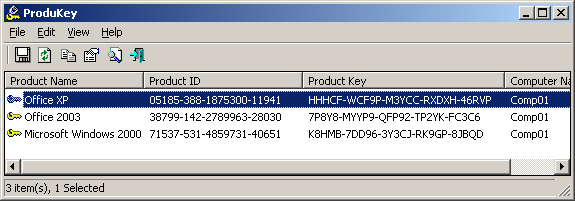
ProduKey is a small utility that displays the ProductID and the CD-Key of Microsoft Office (Microsoft Office 2003, Microsoft Office 2007), Windows (Including Windows 7 and Windows Vista), Exchange Server, and SQL Server installed on your computer. You can view this information for your current running operating system, or for another operating system/computer - by using command-line options. This utility can be useful if you lost the product key of your Windows/Office, and you want to reinstall it on your computer.

Download ProduKey

OWASP OWTF – Offensive (Web) Testing Framework

owasp-owtf-offensive-web-testing-framework
The purpose of this tool is to automate the manual, uncreative part of pen testing: For example, spending time trying to remember how to call "tool X", parsing results of "tool X" manually to feed "tool Y", etc.
By reducing this burden I hope pen testers will have more time to:

  • See the big picture and think out of the box
  • More efficiently find, verify and combine vulnerabilities
  • Have time to investigate complex vulnerabilities like business logic/architectural flaws or virtual hosting sessions
  • Perform more tactical/targeted fuzzing on seemingly risky areas
  • Demonstrate true impact despite the short timeframes we are typically given to test.

Some features like the passive and semi_passive test separation may also assist pen testers wishing to go the extra mile to get a head start and maybe even legitimately start report writing or preparing attacks before they are given the green light to test.
The tool is highly configurable and anybody can trivially create simple plugins or add new tests in the configuration files without having any development experience. Please share your tests with the community! :)
This tool is however not a silverbullet and will only be as good as the person using it: Understanding and experience will be required to correctly interpret tool output and decide what to investigate further in order to demonstrate impact.

Features

  • OWASP Testing Guide-oriented: owtf will try to classify the findings as closely as possible to the OWASP Testing Guide
  • Report updated on the fly: As soon as each plugin finishes or sometimes before (i.e. after each vulnerability scanner finishes)
  • "Scumbag spidering": Instead of implementing yet another spider (a hard job), owtf will scrub the output of all tools/plugins run to gather as many URLs as possible. This is somewhat "cheating" but tremendously effective since it combines the results of different tools, including several tools that perform brute forcing of files and directories.
  • Resilience: If one tool crashes owtf will move on to the next tool/test, saving the partial output of the tool until it crashed
  • Easy to configure: config files are easy to read and modify
  • Easy to run: No strange parameters, DB setup requirements, libraries, complex dependencies, etc
  • Full control of what tests to run, interactivity and hopefully easy to follow examples and help :)
  • Easy to review transaction logs and plain text files with URLs, simple for scripting
  • Basic Google Hacking without (annoying) API Key requirements via "blanket searches", trying a bunch of operators at once, you can then narrow the search down if you find something interesting.
  • Easy to extract data from the database to parse or pass to other tools: They are all text files

Requirements

  • Linux (any Ubuntu derivative should work just fine) and python 2.6.5 or greater
  • Latest Kali version not required but helpful (almost 0 setup time)
  • You do NOT have to have all tools installed: owtf will move on with an error for the missing tools

Download OWASP OWTF

WebSiteSniffer - captures all Web site files downloaded by your Web browser while browsing the Internet

websitesniffer-captures-all-web-site
WebSiteSniffer is a packet sniffer tool that captures all Web site files downloaded by your Web browser while browsing the Internet, and stores them on your hard drive under the base folder that you choose. WebSiteSniffer allows you to choose which type of Web site files will be captured: HTML Files, Text Files, XML Files, CSS Files, Video/Audio Files, Images, Scripts, and Flash (.swf) files.

While capturing the Web site files, the main window of WebSiteSniffer displays general statistics about the downloaded files for every Web site / host name, including the total size of all files (compressed and uncompressed) and total number of files for every file type (HTML, Text, Images, and so on)

Download WebSiteSniffer

Parsero v0.75 - Attacking Robots.txt Files

parsero-v075-attacking-robotstxt-files
Parsero is a free script written in Python which reads the Robots.txt file of a web server and looks at the Disallow entries. The Disallow entries tell the search engines what directories or files hosted on a web server mustn't be indexed. For example, "Disallow: /portal/login" means that the content on www.example.com/portal/login it's not allowed to be indexed by crawlers like Google, Bing, Yahoo... This is the way the administrator have to not share sensitive or private information with the search engines.
But sometimes these paths typed in the Disallows entries are directly accessible by the users without using a search engine, just visiting the URL and the Path, and sometimes they are not available to be visited by anybody... Because it is really common that the administrators write a lot of Disallows and some of them are available and some of them are not, you can use Parsero in order to check the HTTP status code of each Disallow entry in order to check automatically if these directories are available or not.

Also, the fact the administrator write a robots.txt, it doesn't mean that the files or directories typed in the Dissallow entries will not be indexed by Bing, Google, Yahoo... For this reason, Parsero is capable of searching in Bing to locate content indexed without the web administrator authorization. Parsero will check the HTTP status code in the same way for each Bing result.

When you execute Parsero, you can see the HTTP status codes. For example, the codes bellow:

200 OK          The request has succeeded.
403 Forbidden   The server understood the request, but is refusing to fulfill it.
404 Not Found   The server hasn't found anything matching the Request-URI.
302 Found       The requested resource resides temporarily under a different URI.
...

Usage

$ python3 parsero.py -h

usage: parsero.py [-h] [-u URL] [-o] [-sb]

optional arguments:
-h, --help  show this help message and exit
-u URL      Type the URL which will be analyzed
-o          Show only the "HTTP 200" status code
-sb         Search in Bing indexed Disallows

Download Parsero v0.75

OWASP ZAP v2.3.1 - An easy to use integrated penetration testing tool for finding vulnerabilities in web applications

owasp-zap-v231-easy-to-use-integrated
OWASP Zed Attack Proxy (ZAP) An easy to use integrated penetration testing tool for finding vulnerabilities in web applications. It is designed to be used by people with a wide range of security experience and as such is ideal for developers and functional testers who are new to penetration testing as well as being a useful addition to an experienced pen testers toolbox.

Changelog v2.3.1

The following changes were made in this release:

  • ZAP changes request data (while switching views) ( Issue 81 )
  • Unfulfilled dependencies hang the active scan ( Issue 377 )
  • Cant remove scripts marked as ‘load on start’ ( Issue 1073 )
  • core.newSession doesn’t clear Sites ( Issue 1114 )
  • Historical Request Tab Doesn’t allow formatting changes ( Issue 1155 )
  • Proxy gzip decoder doesn’t update content length in response headers ( Issue 1156 )
  • Unable to set a home directory with a space on the command line ( Issue 1163 )
  • Redundant indexes in zapdb.script ( Issue 1166 )
  • Add proxy support for “deflate” content encoding ( Issue 1168 )
  • Spider Context/User pop up menus no longer shown ( Issue 1170 )
  • Unable to select 2 requests in fuzz results (Ctrl + click) ( Issue 1179 )
  • Vulnerable pages active scanned only once ( Issue 1181 )
  • Alerts of same type for different parameters of same vulnerable page shown only once in “Alerts” tree ( Issue 1182 )
  • NullPointerException while selecting a node in the “Alerts” tab after deleting a message ( Issue 1183 )
  • Cmdline session params have no effect ( Issue 1191 )
  • Scan URL path elements – turn off by default ( Issue 1193 )
  • Command line arguments are not passed to extensions when starting ZAP in daemon mode ( Issue 1194 )
  • AbstractPlugin.bingo incorrectly sets evidence to attack ( Issue 1196 )
  • Issue with loading addons that did not initialize correctly ( Issue 1202 )
  • WordPress Authentication Script ( Issue 1203 )
  • ‘History’ tab is not cleared when a new session is created through the API with ZAP in GUI mode ( Issue 1206 )

Download OWASP ZAP v2.3.1

Inception - Attacking FireWire Devices

inception-attacking-firewire-devices
Inception is a FireWire physical memory manipulation and hacking tool exploiting IEEE 1394 SBP-2 DMA. The tool can unlock (any password accepted) and escalate privileges to Administrator/root on almost* any powered on machine you have physical access to. The tool can attack over FireWire, Thunderbolt, ExpressCard, PC Card and any other PCI/PCIe interfaces.

Inception aims to provide a stable and easy way of performing intrusive and non-intrusive memory hacks in order to unlock live computers using FireWire SBP-2 DMA. It it primarily attended to do its magic against computers that utilize full disk encryption such as BitLocker, FileVault, TrueCrypt or Pointsec. There are plenty of other (and better) ways to hack a machine that doesn't pack encryption.

As of version 0.3.5, it is able to unlock the following x86 and x64 operating systems:

OS Version Unlock lock screen Escalate privileges Dump memory < 4 GiB
Windows 8 8.1 Yes Yes Yes
Windows 8 8.0 Yes Yes Yes
Windows 7 SP1 Yes Yes Yes
Windows 7 SP0 Yes Yes Yes
Windows Vista SP2 Yes Yes Yes
Windows Vista SP1 Yes Yes Yes
Windows Vista SP0 Yes Yes Yes
Windows XP SP3 Yes Yes Yes
Windows XP SP2 Yes Yes Yes
Windows XP SP1 Yes
Windows XP SP0 Yes
Mac OS X Mavericks Yes (1) Yes (1) Yes (1)
Mac OS X Mountain Lion Yes (1) Yes (1) Yes (1)
Mac OS X Lion Yes (1) Yes (1) Yes (1)
Mac OS X Snow Leopard Yes Yes Yes
Mac OS X Leopard Yes
Ubuntu (2) Saucy Yes Yes Yes
Ubuntu Raring Yes Yes Yes
Ubuntu Quantal Yes Yes Yes
Ubuntu Precise Yes Yes Yes
Ubuntu Oneiric Yes Yes Yes
Ubuntu Natty Yes Yes Yes
Ubuntu Maverick Yes (3) Yes (3) Yes
Ubuntu Lucid Yes (3) Yes (3) Yes
Linux Mint 13 Yes Yes Yes
Linux Mint 12 Yes Yes Yes

(1): If FileVault 2 is enabled, the tool will only work when the operating system is unlocked. (2): Other Linux distributions that use PAM-based authentication may also work using the Ubuntu signatures. (3): x86 only.

The tool also effectively enables escalation of privileges, for instance via the runas or sudo -s commands, respectively. More signatures will be added. The tool makes use of the libforensic1394 library courtesy of Freddie Witherden under a LGPL license.

Tails - The Amnesic Incognito Live System Released

volafox-mac-os-x-bsd-memory-analysis

Volafox is an open source toolkit that you can use for Mac OS X and BSD forensics. The tool is a python based and allows investigating security incidents and finding information for malwares and any malicious program on the system. Security analyst can have the following information using this tool:

Information
  • Kernel version, CPU and memory spec, boot/sleep/wakeup time
  • Mounted filesystems
  • Process listing and dump address space
  • KEXT(Kernel Extensions) listing
  • System Call / Mach Trap Table (Hooking Detection)
  • Network socket listing
  • Open files listing by process
  • PE State information ( Device Tree, Video Memory Area)
  • EFI information ( EFI System Table, EFI Configuration Table, EFI Runtime Services)
  • extract keychain master key candidates
  • TrustedBSD analysis
  • other command : uname, dmesg ... etc  

Download Volafox

RedoWalker - Tool to explore Oracle database transaction logs

redowalker-tool-to-explore-oracle
RedoWalker is a tool to explore Oracle database transaction logs, otherwise known as redo logs. Any time changes are made to the database server, for example after an INSERT, DELETE or UPDATE, they are recorded in the redo log.

These redo logs are stored in a proprietary and undocumented format and, as such, are unreadable and unintelligible without a tool that can decipher them. Oracle does provide a tool called LogMiner to access the redo logs but to use it access to a live database server is required. RedoWalker is a replacement for LogMiner and removes this requirement. This is particularly useful for auditors, forensic examiners and breach investigators. DBAs can also take advantage of RedoWalker for troubleshooting and problem isolation without the database server; using LogMiner could cause the database server to slow down.


RedoWalker dumps Oracle redo logs to an XML format; it specifically dumps redo entries fro DDL, INSERTs, UPDATEs, DELETEs and associated UNDO records.

System Requirements

  • RedoWalker runs on Windows and requires the .Net Framework.
  • Should work with Oracle 10g, 11g and 12c.

Download RedoWalker

HTTPNetworkSniffer - Http Sniffer Utility

httpnetworksniffer-http-sniffer-utility
HTTPNetworkSniffer is a packet sniffer tool that captures all HTTP requests/responses sent between the Web browser and the Web server and displays them in a simple table. For every HTTP request, the following information is displayed: Host Name, HTTP method (GET, POST, HEAD), URL Path, User Agent, Response Code, Response String, Content Type, Referer, Content Encoding, Transfer Encoding, Server Name, Content Length, Cookie String, and more...

You can easily select one or more HTTP information lines, and then export them to text/html/xml/csv file or copy them to the clipboard and then paste them into Excel.

Download HTTPNetworkSniffer

Tails - The Amnesic Incognito Live System Released

tails-amnesic-incognito-live-system
Tails, The Amnesic Incognito Live System,  is a live system that aims to preserve your privacy and anonymity. It helps you to use the Internet anonymously and circumvent censorship almost anywhere you go and on any computer but leaving no trace unless you ask it to explicitly.


It is a complete operating system designed to be used from a DVD, USB stick, or SD card independently of the computer’s original operating system. It is Free Software and based on Debian GNU/Linux.

Download Tails

Onionshare - Securely and anonymously share a file of any size

onionshare-securely-and-anonymously
OnionShare lets you securely and anonymously share a file of any size with someone. It works by starting a web server, making it accessible as a Tor hidden service, and generating an unguessable URL access and download the file. It doesn't require setting up a server on the internet somewhere or using a third party filesharing service. You host the file on your own computer and use a Tor hidden service to make it temporarily accessible over the internet. The other user just needs to use Tor Browser to download the file from you.