WifiInfoView v1.60 - WiFi Scanner for Windows

wifiinfoview-v160-wifi-scanner-for-windows
WifiInfoView scans the wireless networks in your area and displays extensive information about them, including: Network Name (SSID), MAC Address, PHY Type (802.11g or 802.11n), RSSI, Signal Quality, Frequency, Channel Number, Maximum Speed, Company Name, Router Model and Router Name (Only for routers that provides this information), and more...

When you select a wireless network in the upper pane of this tool, the lower pane displays the Wi-Fi information elements received from this device, in hexadecimal format.

WifiInfoView also has a summary mode, which displays a summary of all detected wireless networks, grouped by channel number, company that manufactured the router, PHY type, or the maximum speed.

Download WifiInfoView v1.60

MagicTree - Penetration Tester Productivity Tool

MagicTree-Penetration-Tester-Productivity-Tool
Have you ever spent ages trying to find the results of a particular portscan you were sure you did? Or grepping through a bunch of files looking for data for a particular host or service? Or copy-pasting bits of output from a bunch of typescripts into a report? We certainly did, and that's why we wrote MagicTree - so that it does such mind-numbing stuff for us, while we spend our time hacking.

MagicTree is a penetration tester productivity tool. It is designed to allow easy and straightforward data consolidation, querying, external command execution and (yeah!) report generation. In case you wonder, "Tree" is because all the data is stored in a tree structure, and "Magic" is because it is designed to magically do the most cumbersome and boring part of penetration testing - data management and reporting.

Installation
No installation is required for MagicTree. The application is distrubuted as a single JAR file which has to be executed with JRE. Just save the file on your desktop. Double-click on it to execute it or, for less user-friendly OSes, issue “java -jar MagicTree.jar’ command.

Download MagicTree

YaCy - The Peer to Peer Search Engine

yacy-peer-to-peer-search-engine
YaCy is a free search engine that anyone can use to build a search portal for their intranet or to help search the public internet. When contributing to the world-wide peer network, the scale of YaCy is limited only by the number of users in the world and can index billions of web pages. It is fully decentralized, all users of the search engine network are equal, the network does not store user search requests and it is not possible for anyone to censor the content of the shared index. We want to achieve freedom of information through a free, distributed web search which is powered by the world's users.

Decentralization
Imagine if, rather than relying on the proprietary software of a large professional search engine operator, your search engine was run by many private computers which aren't under the control of any one company or individual. Well, that's what YaCy does! The resulting decentralized web search currently has about 1.4 billion documents in its index (and growing - download and install YaCy to help out!) and more than 600 peer operators contribute each month. About 130,000 search queries are performed with this network each day.
Live image of the 'freeworld' network
Installation is easy!
The installation takes only three minutes. Just download the release, decompress the package and run the start script. On linux you need OpenJDK7. You don't need to install external databases or a web server, everything is already included in YaCy.

Download YaCy


oclHashcat v1.2 - GPGPU-based Multi-hash Cracker

oclhashcat-v12-gpgpu-based-multi-hash-cracker
oclHashcat is a GPGPU-based multi-hash cracker using a brute-force attack (implemented as mask attack), combinator attack, dictionary attack, hybrid attack, mask attack, and rule-based attack.

This GPU cracker is a fusioned version of oclHashcat-plus and oclHashcat-lite.

GPU Driver requirements:

  • NV users require ForceWare 331.67 or later
  • AMD users require Catalyst 14.4 or later

Changelog v1.21
This release is focused on performance increase / bugfixes.

  • Added support for algorithm -m 2612 = PHPS
  • Added support for algorithm -m 8600 = Lotus Notes/Domino 5
  • Added support for algorithm -m 8700 = Lotus Notes/Domino 6
  • Fixed performance drop on descrypt, LM and oracle-old initiated by AMD drivers
  • Fixed problem with restoring ADL performance state when the clock size reported by the AMD driver didn’t respect the clock step size
  • Fixed problem with setting ADL powertune value for r9 295×2 GPUs
  • Added support for writing logfiles
  • Added parameter –logfile-disable which should be self-explaining
  • Dictstat is now no longer session dependent and will always be based on oclHashcat installation directory
  • Use AMD custom profile settings instead of basing the AMD powertune/clock settings on maximum supported clock values
  • Fixed VLIW size calculated by compute capability was broken for sm_50 -> cuModuleLoad() 301
  • Make –runtime count relative to real attack start not program start
  • Fixed bug with fan speed handling, if fan speed is manually set to a high enought value (e.g. 100%) oclHashcat shouldn’t change it
  • Problem with username parsing (–username) was fixed
  • Fixed problem where IKE-PSK sha1/md5 (-m 5300/-m 5400) were wrongly recognized as shadow file formats
  • Fixed problem where the ‘delete range’ rule (xNM) did not allow to remove charaters at the very end of the word

Full Changelog: here

Features

  • Worlds fastest password cracker
  • Worlds first and only GPGPU based rule engine
  • Free
  • Multi-GPU (up to 128 gpus)
  • Multi-Hash (up to 100 million hashes)
  • Multi-OS (Linux & Windows native binaries)
  • Multi-Platform (OpenCL & CUDA support)
  • Multi-Algo (see below)
  • Low resource utilization, you can still watch movies or play games while cracking
  • Focuses highly iterated modern hashes
  • Focuses dictionary based attacks
  • Supports distributed cracking
  • Supports pause / resume while cracking
  • Supports sessions
  • Supports restore
  • Supports reading words from file
  • Supports reading words from stdin
  • Supports hex-salt
  • Supports hex-charset
  • Built-in benchmarking system
  • Integrated thermal watchdog
  • 100+ Algorithms implemented with performance in mind

Attack-Modes

  • Straight (accept Rules)
  • Combination
  • Brute-force
  • Hybrid dict + mask
  • Hybrid mask + dict

Algorithms

  • MD4
  • MD5
  • SHA1
  • SHA-256
  • SHA-512
  • SHA-3 (Keccak)
  • RipeMD160
  • Whirlpool
  • GOST R 34.11-94
  • HMAC-MD5 (key = $pass)
  • HMAC-MD5 (key = $salt)
  • HMAC-SHA1 (key = $pass)
  • HMAC-SHA1 (key = $salt)
  • HMAC-SHA256 (key = $pass)
  • HMAC-SHA256 (key = $salt)
  • HMAC-SHA512 (key = $pass)
  • HMAC-SHA512 (key = $salt)
  • LM
  • NTLM
  • DCC
  • DCC2
  • NetNTLMv1
  • NetNTLMv1 + ESS
  • NetNTLMv2
  • Kerberos 5 AS-REQ Pre-Auth etype 23
  • AIX {smd5}
  • AIX {ssha1}
  • AIX {ssha256}
  • AIX {ssha512}
  • FreeBSD MD5
  • OpenBSD Blowfish
  • descrypt
  • md5crypt
  • bcrypt
  • sha256crypt
  • sha512crypt
  • DES(Unix)
  • MD5(Unix)
  • SHA256(Unix)
  • SHA512(Unix)
  • OSX v10.4
  • OSX v10.5
  • OSX v10.6
  • OSX v10.7
  • OSX v10.8
  • OSX v10.9
  • Cisco-ASA
  • Cisco-IOS
  • Cisco-PIX
  • GRUB 2
  • Juniper Netscreen/SSG (ScreenOS)
  • RACF
  • Samsung Android Password/PIN
  • MSSQL
  • MySQL
  • Oracle
  • Postgres
  • Sybase
  • DNSSEC (NSEC3)
  • IKE-PSK
  • IPMI2 RAKP
  • iSCSI CHAP
  • WPA
  • WPA2
  • 1Password, cloudkeychain
  • 1Password, agilekeychain
  • Lastpass
  • Password Safe SHA-256
  • TrueCrypt 5.0+ PBKDF2 HMAC-RipeMD160 + AES
  • TrueCrypt 5.0+ PBKDF2 HMAC-SHA512 + AES
  • TrueCrypt 5.0+ PBKDF2 HMAC-Whirlpool + AES
  • TrueCrypt 5.0+ PBKDF2 HMAC-RipeMD160 + AES + boot-mode
  • TrueCrypt 5.0+ PBKDF2 HMAC-RipeMD160 + AES + hidden-volume
  • TrueCrypt 5.0+ PBKDF2 HMAC-SHA512 + AES + hidden-volume
  • TrueCrypt 5.0+ PBKDF2 HMAC-Whirlpool + AES + hidden-volume
  • TrueCrypt 5.0+ PBKDF2 HMAC-RipeMD160 + AES + hidden-volume + boot-mode
  • SAP CODVN B (BCODE)
  • SAP CODVN F/G (PASSCODE)
  • Citrix Netscaler
  • Netscape LDAP SHA/SSHA
  • Apache MD5-APR
  • hMailServer
  • EPiServer
  • Drupal
  • IPB
  • Joomla
  • MyBB
  • osCommerce
  • Redmine
  • SMF
  • vBulletin
  • Woltlab Burning Board
  • xt:Commerce
  • WordPress
  • phpBB3
  • Half MD5 (left, mid, right)
  • Double MD5
  • Double SHA1
  • md5($pass.$salt)
  • md5($salt.$pass)
  • md5(unicode($pass).$salt)
  • md5($salt.unicode($pass))
  • md5(sha1($pass))
  • sha1($pass.$salt)
  • sha1($salt.$pass)
  • sha1(unicode($pass).$salt)
  • sha1($salt.unicode($pass))
  • sha1(md5($pass))
  • sha256($pass.$salt)
  • sha256($salt.$pass)
  • sha256(unicode($pass).$salt)
  • sha256($salt.unicode($pass))
  • sha512($pass.$salt)
  • sha512($salt.$pass)
  • sha512(unicode($pass).$salt)
  • sha512($salt.unicode($pass))

Download oclHashcat v1.21

Hook Analyser 3.1 - Malware Analysis Tool

hook-analyser-31-malware-analysis-too
Hook Analyser is a freeware application which allows an investigator/analyst to perform “static & run-time / dynamic” analysis of suspicious applications, also gather (analyse & co-related) threat intelligence related information (or data) from various open sources on the Internet.

Essentially it’s a malware analysis tool that has evolved to add some cyber threat intelligence features & mapping.

Hook Analyser is perhaps the only “free” software in the market which combines analysis of malware analysis and cyber threat intelligence capabilities. The software has been used by major Fortune 500 organisations.

Features/Functionality

  • Spawn and Hook to Application – Enables you to spawn an application, and hook into it
  • Hook to a specific running process – Allows you to hook to a running (active) process
  • Static Malware Analysis – Scans PE/Windows executables to identify potential malware traces
  • Application crash analysis – Allows you to analyse memory content when an application crashes
  • Exe extractor – This module essentially extracts executables from running process/s


Download Hook Analyser 3.1

ProduKey - Recover lost Windows product key (CD-Key) and Office 2003/2007 product key

ProduKey-Recover-lost-Windows-product-key-and-Office-2003-2007-product-key
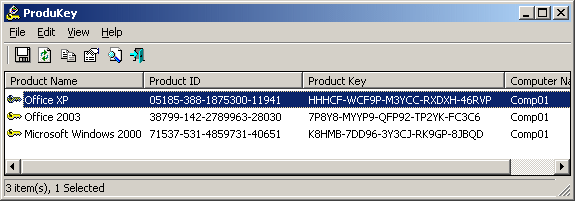
ProduKey is a small utility that displays the ProductID and the CD-Key of Microsoft Office (Microsoft Office 2003, Microsoft Office 2007), Windows (Including Windows 7 and Windows Vista), Exchange Server, and SQL Server installed on your computer. You can view this information for your current running operating system, or for another operating system/computer - by using command-line options. This utility can be useful if you lost the product key of your Windows/Office, and you want to reinstall it on your computer.

Download ProduKey

WebSiteSniffer - captures all Web site files downloaded by your Web browser while browsing the Internet

websitesniffer-captures-all-web-site
WebSiteSniffer is a packet sniffer tool that captures all Web site files downloaded by your Web browser while browsing the Internet, and stores them on your hard drive under the base folder that you choose. WebSiteSniffer allows you to choose which type of Web site files will be captured: HTML Files, Text Files, XML Files, CSS Files, Video/Audio Files, Images, Scripts, and Flash (.swf) files.

While capturing the Web site files, the main window of WebSiteSniffer displays general statistics about the downloaded files for every Web site / host name, including the total size of all files (compressed and uncompressed) and total number of files for every file type (HTML, Text, Images, and so on)

Download WebSiteSniffer

Parsero v0.75 - Attacking Robots.txt Files

parsero-v075-attacking-robotstxt-files
Parsero is a free script written in Python which reads the Robots.txt file of a web server and looks at the Disallow entries. The Disallow entries tell the search engines what directories or files hosted on a web server mustn't be indexed. For example, "Disallow: /portal/login" means that the content on www.example.com/portal/login it's not allowed to be indexed by crawlers like Google, Bing, Yahoo... This is the way the administrator have to not share sensitive or private information with the search engines.
But sometimes these paths typed in the Disallows entries are directly accessible by the users without using a search engine, just visiting the URL and the Path, and sometimes they are not available to be visited by anybody... Because it is really common that the administrators write a lot of Disallows and some of them are available and some of them are not, you can use Parsero in order to check the HTTP status code of each Disallow entry in order to check automatically if these directories are available or not.

Also, the fact the administrator write a robots.txt, it doesn't mean that the files or directories typed in the Dissallow entries will not be indexed by Bing, Google, Yahoo... For this reason, Parsero is capable of searching in Bing to locate content indexed without the web administrator authorization. Parsero will check the HTTP status code in the same way for each Bing result.

When you execute Parsero, you can see the HTTP status codes. For example, the codes bellow:

200 OK          The request has succeeded.
403 Forbidden   The server understood the request, but is refusing to fulfill it.
404 Not Found   The server hasn't found anything matching the Request-URI.
302 Found       The requested resource resides temporarily under a different URI.
...

Usage

$ python3 parsero.py -h

usage: parsero.py [-h] [-u URL] [-o] [-sb]

optional arguments:
-h, --help  show this help message and exit
-u URL      Type the URL which will be analyzed
-o          Show only the "HTTP 200" status code
-sb         Search in Bing indexed Disallows

Download Parsero v0.75

OWASP ZAP v2.3.1 - An easy to use integrated penetration testing tool for finding vulnerabilities in web applications

owasp-zap-v231-easy-to-use-integrated
OWASP Zed Attack Proxy (ZAP) An easy to use integrated penetration testing tool for finding vulnerabilities in web applications. It is designed to be used by people with a wide range of security experience and as such is ideal for developers and functional testers who are new to penetration testing as well as being a useful addition to an experienced pen testers toolbox.

Changelog v2.3.1

The following changes were made in this release:

  • ZAP changes request data (while switching views) ( Issue 81 )
  • Unfulfilled dependencies hang the active scan ( Issue 377 )
  • Cant remove scripts marked as ‘load on start’ ( Issue 1073 )
  • core.newSession doesn’t clear Sites ( Issue 1114 )
  • Historical Request Tab Doesn’t allow formatting changes ( Issue 1155 )
  • Proxy gzip decoder doesn’t update content length in response headers ( Issue 1156 )
  • Unable to set a home directory with a space on the command line ( Issue 1163 )
  • Redundant indexes in zapdb.script ( Issue 1166 )
  • Add proxy support for “deflate” content encoding ( Issue 1168 )
  • Spider Context/User pop up menus no longer shown ( Issue 1170 )
  • Unable to select 2 requests in fuzz results (Ctrl + click) ( Issue 1179 )
  • Vulnerable pages active scanned only once ( Issue 1181 )
  • Alerts of same type for different parameters of same vulnerable page shown only once in “Alerts” tree ( Issue 1182 )
  • NullPointerException while selecting a node in the “Alerts” tab after deleting a message ( Issue 1183 )
  • Cmdline session params have no effect ( Issue 1191 )
  • Scan URL path elements – turn off by default ( Issue 1193 )
  • Command line arguments are not passed to extensions when starting ZAP in daemon mode ( Issue 1194 )
  • AbstractPlugin.bingo incorrectly sets evidence to attack ( Issue 1196 )
  • Issue with loading addons that did not initialize correctly ( Issue 1202 )
  • WordPress Authentication Script ( Issue 1203 )
  • ‘History’ tab is not cleared when a new session is created through the API with ZAP in GUI mode ( Issue 1206 )

Download OWASP ZAP v2.3.1

RedoWalker - Tool to explore Oracle database transaction logs

redowalker-tool-to-explore-oracle
RedoWalker is a tool to explore Oracle database transaction logs, otherwise known as redo logs. Any time changes are made to the database server, for example after an INSERT, DELETE or UPDATE, they are recorded in the redo log.

These redo logs are stored in a proprietary and undocumented format and, as such, are unreadable and unintelligible without a tool that can decipher them. Oracle does provide a tool called LogMiner to access the redo logs but to use it access to a live database server is required. RedoWalker is a replacement for LogMiner and removes this requirement. This is particularly useful for auditors, forensic examiners and breach investigators. DBAs can also take advantage of RedoWalker for troubleshooting and problem isolation without the database server; using LogMiner could cause the database server to slow down.


RedoWalker dumps Oracle redo logs to an XML format; it specifically dumps redo entries fro DDL, INSERTs, UPDATEs, DELETEs and associated UNDO records.

System Requirements

  • RedoWalker runs on Windows and requires the .Net Framework.
  • Should work with Oracle 10g, 11g and 12c.

Download RedoWalker

HTTPNetworkSniffer - Http Sniffer Utility

httpnetworksniffer-http-sniffer-utility
HTTPNetworkSniffer is a packet sniffer tool that captures all HTTP requests/responses sent between the Web browser and the Web server and displays them in a simple table. For every HTTP request, the following information is displayed: Host Name, HTTP method (GET, POST, HEAD), URL Path, User Agent, Response Code, Response String, Content Type, Referer, Content Encoding, Transfer Encoding, Server Name, Content Length, Cookie String, and more...

You can easily select one or more HTTP information lines, and then export them to text/html/xml/csv file or copy them to the clipboard and then paste them into Excel.

Download HTTPNetworkSniffer

w3af - Open Source Web Application Security Scanner

w3af-open-source-web-application
w3af, is a Web Application Attack and Audit Framework. The w3af core and it’s plugins are fully written in python, it identifies more than 200 vulnerabilities and reduce your site’s overall risk exposure. Identify vulnerabilities like SQL Injection, Cross-Site Scripting, Guessable credentials, Unhandled application errors and PHP misconfigurations.

Changelog v1.6

  • Improved performance: your scans will run faster
  • Improved quality: 1300+ unittests are run after each change to make sure we don’t add any regressions
  • Now you’ll be able to easily integrate w3af into other projects with a simple import w3af
  • Better documentation

WVS v9.5 - Acunetix Web Vulnerability Scanner

WVS-v9.5-Acunetix-Web-Vulnerability-Scanner

Acunetix Web Vulnerability Scanner (WVS) is an automated web application security testing tool that audits your web applications by checking for exploitable hacking vulnerabilities. Automated scans may be supplemented and cross-checked with the variety of manual tools to allow for comprehensive web site and web application penetration testing.

This week the latest version was released, Acunetix Vulnerability Scanner 9.5.

Features
  • AcuSensor Technology
  • Industry’s most advanced and in-depth SQL injection and Cross site scripting testing
  • Advanced penetration testing tools, such as the HTTP Editor and the HTTP Fuzzer
  • Visual macro recorder makes testing web forms and password protected areas easy
  • Support for pages with CAPTCHA, single sign-on and Two Factor authentication mechanisms
  • Extensive reporting facilities including PCI compliance reports
  • Multi-threaded and lightning fast scanner – processes thousands of pages with ease
  • Intelligent crawler detects web server type, application language and smartphone-optimized sites.
  • Acunetix crawls and analyzes different types of websites including HTML5, SOAP and AJAX
  • Port scans a web server and runs security checks against network services running on the server
This new release adds the ability to run security scans on applications built with Google Web Toolkit (GWT). It can also automatically test JSON and XML data objects for vulnerabilities. In addition, vulnerabilities are now also classified using CVE, CWE and CVSS, and AcuSensor has been updated for .NET 4.5 web applications.

Tor Browser v3.6 - Anonymity Online and defend yourself against network surveillance and traffic analysis

Tor-Browser-v3.6-Anonymity-Online-and-defend-yourself-against-network-surveillance-and-traffic-analysis

The Tor Browser Bundle lets you use Tor on Windows, Mac OS X, or Linux without needing to install any software. It can run off a USB flash drive, comes with a pre-configured web browser to protect your anonymity, and is self-contained.

Changelog v3.6
Here is the complete changelog since TBB 3.5.4:
  • All Platforms
    • Update Firefox to 24.5.0esr
    • Include Pluggable Transports by default:
      • Obfsproxy3 0.2.4, Flashproxy 1.6, and FTE 0.2.13 are now included
    • Bug 11586: Include license files for component software in Docs directory.
    • Bug 9010: Add Turkish language support.
    • Bug 9387 testing: Disable JS JIT, type inference, asmjs, and ion.
    • Update NoScript to 2.6.8.20
    • Update Tor Launcher to 0.2.5.4
      • Bug 9665: Localize Tor’s unreachable bridges bootstrap error
      • Bug 10418: Provide UI configuration for Pluggable Transports
      • Bug 10604: Allow Tor status & error messages to be translated
      • Bug 10894: Make bridge UI clear that helpdesk is a last resort for bridges
      • Bug 10610: Clarify wizard UI text describing obstacles/blocking
      • Bug 11074: Support Tails use case (XULRunner and optional customizations)
      • Bug 11482: Hide bridge settings prompt if no default bridges.
      • Bug 11484: Show help button even if no default bridges.
    • Update Torbutton to 1.6.9.0:
      • Bug 11242: Fix improper “update needed” message after in-place upgrade.
      • Bug 10398: Ease translation of about:tor page elements
      • Bug 9901: Fix browser freeze due to content type sniffing
      • Bug 10611: Add Swedish (sv) to extra locales to update
      • Bug 7439: Improve download warning dialog text.
      • Bug 11384: Completely remove hidden toggle menu item.
    • Backport Pending Tor Patches:
      • Bug 9665: Report a bootstrap error if all bridges are unreachable
      • Bug 11200: Prevent spurious error message prior to enabling network.
      • Bug 5018: Don’t launch Pluggable Transport helpers if not in use
      • Bug 9229: Eliminate 60 second stall during bootstrap with some PTs
      • Bug 11069: Detect and report Pluggable Transport bootstrap failures
      • Bug 11156: Prevent spurious warning about missing pluggable transports
  • Mac:
    • Bug 4261: Use DMG instead of ZIP for Mac packages
    • Bug 9308: Prevent install path from leaking in some JS exceptions on Mac and Windows
  • Linux:
    • Bug 11190: Switch linux PT build process to python2
    • Bug 10383: Enable NIST P224 and P256 accel support for 64bit builds.
  • Windows:
    • Bug 9308: Prevent install path from leaking in some JS exceptions on Mac and Windows
Here is the changelog since the 3.6-beta-2:
  • All Platforms
    • Update Firefox to 24.5.0esr
    • Update Tor Launcher to 0.2.5.4
      • Bug 11482: Hide bridge settings prompt if no default bridges.
      • Bug 11484: Show help button even if no default bridges.
    • Update Torbutton to 1.6.9.0
      • Bug 7439: Improve download warning dialog text.
      • Bug 11384: Completely remove hidden toggle menu item.
    • Update NoScript to 2.6.8.20
    • Update fte transport to 0.2.13
    • Backport Pending Tor Patches:
      • Bug 11156: Additional obfsproxy startup error message fixes
    • Bug 11586: Include license files for component software in Docs directory.
  • Windows and Mac:
    • Bug 9308: Prevent install path from leaking in some JS exceptions on Mac and Windows builds

Cuckoo Sandbox v1.1 - Automated Malware Analysis

Cuckoo-Sandbox-v1.1-Automated-Malware-Analysis
Cuckoo Sandbox is a malware analysis system. It simply means that you can throw any suspicious file at it and in a matter of seconds Cuckoo will provide you back some detailed results outlining what such file did when executed inside an isolated environment.

Cuckoo generates a handful of different raw data which include:

  • Native functions and Windows API calls traces
  • Copies of files created and deleted from the filesystem
  • Dump of the memory of the selected process
  • Full memory dump of the analysis machine
  • Screenshots of the desktop during the execution of the malware analysis
  • Network dump generated by the machine used for the analysis

In order to make such results more consumable to the end users, Cuckoo is able to process them and generate different type of reports, which could include:

  • JSON report
  • HTML report
  • MAEC report
  • MongoDB interface
  • HPFeeds interface

Even more interestingly, thanks to Cuckoo’s extensive modular design, you are able to customize both the processing and the reporting stages. Cuckoo provides you all the requirements to easily integrate the sandbox into your existing frameworks and storages with the data you want, in the way you want, with the format you want.

Changelog v1.1

  • Added imphash to static PE analysis
  • Added search for URLs in the web interface
  • Added search for PE Imphash in the web interface
  • Added possibility in web interface to queue to all machines
  • Added filtering by behavior category in Django web interface
  • Added analyzer log to Django web interface
  • Added REST API to retrieve screenshots associated with a task
  • Added REST API to retrieve the PCAP associated with a task
  • Added database migration utility
  • Added remote submission to submit.py utility
  • Added small stats utility (utils/stats.py)
  • Added analysis package for PowerShell scripts
  • Added overlay configuration for signatures (data/signatures_overlay.json)
  • Fixed bug in MAEC report
  • Fixed package selection for Office documents and CPL scripts
  • Fixed issue with tcpdump filters
  • Fixed unhandled exception when uploading files to the analysis machines
  • Fixed issues in CuckooMon that resulted in Internet Explorer crashes
  • Fixed bug in CuckooMon that caused mutexes to be resolved as file paths
  • Fixed bug in behavior processing module that resulted in a trailing backslash in summary’s registry keys

Acrylic WiFi Free - Real-time WLAN information and network analysis

Acrylic-WiFi-Free-Real-time-WLAN-information-and-network-analysis

Acrylic WiFi enables identificating WiFi access points, obtaining information of the security mechanisms and obtaining generic WiFi passwords thanks to a plugins system.
  • Access points: WLAN network information (SSID and BSSID) and clients connected to the network.
  • Signal level: Signal quality charts (RSSI) of detected devices.
  • Inventory: Naming known devices.
  • Passwords: WiFi passwords and WPS Keys factory configured.
  • Channels: Channel scanner and WiFi networks through channels in 2.4Ghz and 5Ghz.
  • Security: Network authentication and security details for WEP, WPA, WPA2 and Enterprise (802.1X).
  • Hardware: No special hardware is required for its operation.

Host-Extract - Enumerate All IP/Host Patterns In A Web Page

This little ruby script tries to extract all IP/Host patterns in page response of a given URL and JavaScript/CSS files of that URL.

With it, you can quickly identify internal IPs/Hostnames, development IPs/ports, cdn, load balancers, additional attack entries related to your target that are revealed in inline js, css, html comment areas and js/css files.

This is unlike web crawler which looks for new links only in anchor tags (<a) or the like.

(you might miss many additional targets if you ever use such web crawler or other GUI-based tools that shows you your main target and its relationship with its linked sub/off-site domains)
In some cases, host-extract may give you false positives when there are some words like - main-site_ver_10.2.1.3.swf.

With -v option, you can ask the tool to output html view-source snippets for each IP/Domain extracted. This will shorten your manual analysis time.


USAGE:
ruby host-extract.rb URL [option]

Usage: host-extract [options]
        -a               find all ip/host patterns
        -j               scan all js files
        -c               scan all css files
        -v               append view-source html snippet for manual verification

Kautilya v0.4.5 - Pwnage with Human Interface Devices

Kautilya-v0.4.5-Pwnage-with-Human-Interface-Devices
Kautilya is a toolkit which provides various payloads for Teensy device which may help in breaking in a computer. The toolkit is written in Ruby.

  • The Windows payloads and modules are written mostly in powershell (in combination with native commands) and are tested on Windows 7.
  • The Linux payloads are mostly commands in combination with little Bash scripting. These are tested on Ubuntu 11.
  • The OS X payloads are shell scripts (those installed by default) with usage of native commands. Tested on OS X Lion running on a VMWare.

Changelog v0.4.5

  • Bug fixes and improvements in Time Based Exec. It now supports exfiltration and could be stopped remotely.
  • Less lines of code for HTTP Backdoor and Download Execute PS.
  • HTTP Backdoor, Download Execute PS, Hashdump and Exfiltrate and Dump LSA Secrets now execute the downloaded script in memory.
  • Shortened parameters passed to powershell.exe when the scripts are called. Thus, saving the time in “typing” by HID.
  • Added two new exfiltration options, POST requests and DNS TXT records.
  • Username and password for exfiltration would be asked only if you select gmail or pastebin.
  • Tinypaste as an option for exfiltration has been removed.
  • Payloads have been made more modular which results in smaller size.
  • Reboot Persistence has been added to HTTP Backdoor and DNS TXT Backdoor.
  • Menu redesign.
  • Bug fix in Dump LSA Secrets payload.
  • Added ./extras/Decode.ps1. Use this to decode data exfiltrated by HTTP Backdoor and DNS TXT Backdoor.
  • Added ./extras/Remove-Persistence.ps1. Use this to remove persistence by Keylogger, HTTP Backdoor and DNS TXT Backdoor.
  • Kautilya could be run on Windows if win32console gem is installed.

Acunetix Web Vulnerability Scanner Version 9 - Web Application Security Testing Tool

Acunetix Web Vulnerability Scanner (WVS) is an automated web application security testing tool that audits your web applications by checking for exploitable hacking vulnerabilities. Automated scans may be supplemented and cross-checked with the variety of manual tools to allow for comprehensive web site and web application penetration testing.

Changelog v9.20140206

New Functionality in Acunetix Web Vulnerability Scanner v9
  • Added a test for Joomla! JomSocial component < 3.1.0.1 – Remote code execution
  • Added a test for a MediaWiki Remote Code Execution vulnerability affecting versions older than 1.22.2,1.21.5 and 1.19.11
  • Added a test for Minify arbitrary file disclosure 
  • Added a test for Ektron CMS admin account takeover
  • Added a test for Zabbix SQL injection vulnerability
  • Added a test for IBM Web Content Manager XPath Injection
  • Added a test for YUI library uploader.swf cross site scripting vulnerability. This library is included in many web applications, including vBulletin v4 and v5
  • Added a test for Horde Remote Code Execution
  • Added a test for Joomla! JCE Arbitrary File Upload
  • Added a test for Oracle Reports vulnerabilities. These vulnerabilities allow an attacker to gain remote shell on the affected server
  • Added a test for XXE vulnerabilities in OpenID implementations, which is able to detect XXE vulnerabilities similar to the one found on Facebook recently
  • A knowledge base item is added each time a known web application is detected (e.g. WordPress web application was detected in directory /blog/)
Improvements
  • Scanning of WordPress sites has been made more efficient
  • Improved coverage of ASP.NET based websites
  • Improved XSS testing script
Bug Fixes
  • Fixed bug in the pagination of the Scheduler Web Interface
  • The Login Sequence Recorder was ignoring the maximum size HTTP option
  • Fixed an issue causing the crawler to create multiple entries of the same custom cookie.
  • Fixed a bug causing the HTTP sniffer to always listen on localhost
  • Fixed a bug in the console application preventing scanning from older saved crawl results.
  • Fixed a crash caused at start-up caused by the DeepScan agent not starting.

ModSecurity v2.8.0 - Open Source Web Application Firewall

ModSecurity™ is an open source, free web application firewall (WAF) Apache module. With over 70% of all attacks now carried out over the web application level, organizations need all the help they can get in making their systems secure.

Changelog v2.8.0
Bug fix
  • Build issue: Now using autotools to identify if sys/utsname.h is present.
  • Changed configure.ac version to 2.8
Changelog v2.8.0-rc1:
New features
  • JSON Parser is no longer under tests. Now it is part of our mainline.
  • Connection limits (SecConnReadStateLimit/SecConnWriteStateLimit) now support white and suspicious list.
  • New variables: FULL_REQUEST and FULL_REQUEST_LENGTH were added, allowing the rules to access the full content of a request.
  • ModSecurity status is now part of our mainline.
  • New operator: @detectXSS was added. It makes usage of the newest libinjection XSS detection functionality.
  • Append and prepend are now supported on nginx (Ref: #635);
  • SecServerSignature is now available on nginx (Ref: #637);
Improvements
  • Regression tests are not able to expect different values according to the platform;
  • Visual C++ 12/10 runtime dependencies are now part of the IIS installer, no need to have it installed prior ModSecurity installation (Ref: #627);
  • New script was added to the IIS versions to identify whenever there is a missing dependency (available through the Application Menu);
  • Memory usage improvement: using correct memory pools according to the context (Ref: #618#620,#619);
  • Independent API call to free the connection allocations, independently from the request objects, improvements on Nginx performance, vide issue for more information (Ref: #620#648);
  • IIS installer is now using the correct 32/64bits folders to install;
  • IIS Installer 32bits now refuses to install on 64bits environments;
  • IIS: Using new WiX options to build the package in the correct architecture;
  • While installing IIS version the installer will remove old ModSecurityIIS configuration or files before proceed with the installation, avoiding further errors;
  • CRS from IIS version was upgraded to 2.2.9;
  • IIS installer does not support repair anymore, in fact it was not working already and it is now disabled;
  • ModSecurity now warns the user who tries to use “proxy” in IIS or Nginx. Proxy is Apache only;
  • Remove warnings from the build process (Ref: #617);
  • Apache configuration in regression tests was changed making it more platform independent;
  • Reduced the amount of warnings during the compilation (Ref: #385a2828e87897bd611bd2a519727ef88dc6d632, #1e63e49db4a592d28e08a33fc60750c37a3886fe);
  • Regression tests were refactored to be more Nginx friendly;
  • Fixed some regression tests that were not being flexible to handle multiple platforms: (Ref #636);
    • Fixed config/00-load-modsec.t test case. Now it expects for Nginx loaded message as it does for Apache. (Ref: #643);
    • Fixed mixed/10-misc-directives.t. Now it does not expect for SecServerSignature on the logs, just in the headers as the Nginx does in silence;
    • Fixed tnf/10-tfn-cache.t, action/10-logging.t, config/10-misc-directives.t, config/10-request-directives.t, misc/00-multipart-parser.t , misc/10-tfn-cache.t, rule/20-exceptions.t, rule/00-basics.t, rule/10-xml.t;
    • Increased the timeout while reading the auditlog;
    • SecAuditLogType Concurrent was removed from the regression test case, not compatible with all ports yet;
    • Regression tests were speeded up, as the number of tests are growing it is impossible to have it slow;
    • Fixed regression tests scripts paths, to make it MacOS friendly;
    • Avoiding dead locks on Nginx regression tests by enforcing a timeout whenever a request appears to fail;
  • Updates to fix errors found by Parfait static code analysis (Ref: #612);
  • Cleaning up on the repository, by removing unused files;
  • IIS installer now supports to perform the installation without register the DLL on the system. It means that the user can download our MSI installer as it was a tarball archive (Ref #629#624);
  • IIS now support 32bits and 64bits pools, both are registered on IIS (Ref #628).
Bug fix
  • Correctly handling inet_pton in IIS version;
  • Nginx was missing a terminator while the charset string was mounted (Ref: #148);
  • Added mod_extract_forwarded.c to run before mod_security2.c (Ref: #594);
  • Added missing environment variables to regression tests;
  • Build system is now more flexible by looking at liblua at: /usr/local/lib;
  • Fixed typo in README file.
  • Removed the non standard compliant HTTP response status code 44 from modsecurity recommended file (Ref: #665);
  • Fixed segmentation fault if it fails to write on the audit log (Ref: #668);
  • Not rejecting a larger request with ProcessPartial. Regression tests were also added (Ref: #597);
  • Fixed UF8 to unicode conversion. Regression tests were also added(Ref: #672);
  • Avoiding segmentation fault by checking if a structure is null before access its members;
  • Removed double charset-header that used happen due a hardcoded charset in Nginx implementation (Ref: #650);
  • Now alerting the users that there is no memory to proceed loading the configuration instead of just die;
  • If SecRuleEngine is set to Off and SecRequestBodyAccess On Nginx returns error 500. Standalone is now capable to identify whenever ModSecurity is enabled or disabled, independently of ModSecurity core (Ref: #645);
  • Fixed missing headers on Nginx whenever SecResponseBodyAccess was set to On and happens to be a filter on phase equals or over 3. (Ref #634);
  • IIS is now picking the correct version of AppCmd while uninstalling or installing ModSecurityISS. (Ref#632).